

Note
Go to the end to download the full example code.
03 Generating Data with PyCFAST#
This example demonstrates how to use PyCFAST with NumPy to generate simulation data by running multiple CFAST fire simulations with varying parameters.
We’ll create a simple parametric study by varying fire characteristics and analyze the trends in the results.
Step 1: Import Required Libraries#
We’ll import:
NumPy: For generating parameter ranges and arrays
Matplotlib: For visualizing the generated data
PyCFAST: For parsing and running CFAST models (see
parse_cfast_fileandrun)
import os

import matplotlib.pyplot as plt
import numpy as np

from pycfast.parsers import parse_cfast_file
Step 2: Load Base Model#
We start with an existing CFAST model as our template. We’ll use USN_Hawaii_Test_03.in input file. This model serves as the foundation that we’ll modify systematically to generate our dataset.
model = parse_cfast_file("data/USN_Hawaii_Test_03.in")
The parsed model is displayed below.
print(model.summary())
Model: USN_Hawaii_Test_03_parsed.in
Simulation: 'HawaiiTest 3' (570s)

Components:
  Material Properties (2):
    Material 'CONCRETE' (Concrete Normal Weight (6 in)): k=1.6, ρ=2400.0, c=0.75, t=0.15, ε=0.94
    Material 'STEELSHT' (Steel Plain Carbon (1/16 in)): k=60.0, ρ=7850.0, c=0.48, t=0.0015, ε=0.9
  Compartment (1):
    Compartment 'Bay 1': 97.6x74.0x14.8 m, volume: 106891.52 m³ (ceiling: CONCRETE, wall: CONCRETE, floor: CONCRETE)
  Fire (1):
    Fire 'Hawaii_03' (Hawaii_03_Fire) in 'Bay 1' at (36.7, 39.9) (peak: 1 kW, duration: 11min, χr: 0.4)
  Device (1):
    Target 'Targ 1' (PLATE) in 'Bay 1' at (36.7, 39.9, 14.7) (material: STEELSHT, depth: 0.00075m)
Step 3: Generate Parameter Combinations#
We use NumPy to create systematic parameter variations. For this study, we’ll vary two fire parameters:
Heat of combustion: Energy released per unit mass of fuel (affects fire intensity)
Radiative fraction: Portion of fire energy released as radiation (affects heat transfer)
n_samples = 10

heat_of_combustion_values = np.linspace(15, 5000, n_samples)
radiative_fraction_values = np.linspace(0.1, 0.9, n_samples)

parameter_combinations = list(
    zip(heat_of_combustion_values, radiative_fraction_values, strict=False)
)
Step 4: Run simulations with varying parameters#
Now we’ll systematically modify the model parameters and run simulations
to generate our dataset. We’ll update the fire parameters for each simulation using
update_fire_params and run the model with
run.
all_runs = []

for i, (hoc, rf) in enumerate(parameter_combinations):
    print(f"Simulation {i + 1}/{len(parameter_combinations)}: hoc={hoc}, rf={rf}")

    temp_model = model.update_fire_params(
        fire="Hawaii_03_Fire", heat_of_combustion=hoc, radiative_fraction=rf
    )

    outputs = temp_model.run(file_name=f"data_gen_sim_{i:03d}.in")
    all_runs.append(
        {
            "simulation_id": i,
            "hoc": hoc,
            "rf": rf,
            "outputs": outputs,
        }
    )
Simulation 1/10: hoc=15.0, rf=0.1
Simulation 2/10: hoc=568.8888888888889, rf=0.18888888888888888
Simulation 3/10: hoc=1122.7777777777778, rf=0.2777777777777778
Simulation 4/10: hoc=1676.6666666666667, rf=0.3666666666666667
Simulation 5/10: hoc=2230.5555555555557, rf=0.4555555555555556
Simulation 6/10: hoc=2784.4444444444443, rf=0.5444444444444445
Simulation 7/10: hoc=3338.3333333333335, rf=0.6333333333333333
Simulation 8/10: hoc=3892.2222222222226, rf=0.7222222222222222
Simulation 9/10: hoc=4446.111111111111, rf=0.8111111111111111
Simulation 10/10: hoc=5000.0, rf=0.9
Step 5: Analyze Generated Data#
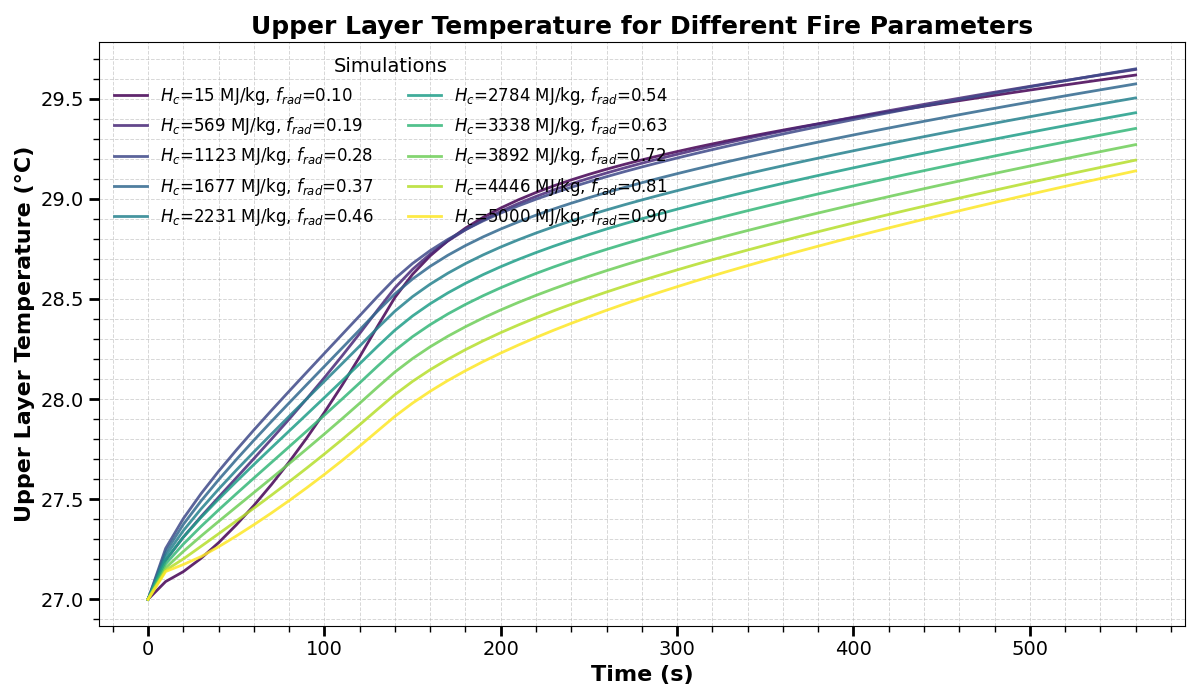
Now we visualize our generated dataset to understand how the parameter variations affect fire behavior.
plt.figure(figsize=(12, 7))
colors = plt.get_cmap("viridis")(np.linspace(0, 1, len(all_runs)))

for idx, run in enumerate(all_runs):
    upper_layer = run["outputs"]["compartments"]["ULT_1"]
    time = run["outputs"]["compartments"]["Time"]
    plt.plot(
        time,
        upper_layer,
        label=(f"$H_c$={run['hoc']:.0f} kJ/kg, $f_{{rad}}$={run['rf']:.2f}"),
        linewidth=2,
        alpha=0.85,
        color=colors[idx],
    )

plt.xlabel("Time (s)", fontsize=16, fontweight="bold")
plt.ylabel("Upper Layer Temperature (°C)", fontsize=16, fontweight="bold")
plt.title(
    "Upper Layer Temperature for Different Fire Parameters",
    fontsize=18,
    fontweight="bold",
)
plt.legend(
    loc="upper left",
    fontsize=12,
    frameon=False,
    ncol=2,
    title="Simulations",
    title_fontsize=14,
)
plt.grid(True, which="both", linestyle="--", linewidth=0.7, alpha=0.5)
plt.minorticks_on()
plt.tick_params(axis="both", which="major", labelsize=14, length=7, width=2)
plt.tick_params(axis="both", which="minor", labelsize=12, length=4, width=1)
plt.tight_layout()
plt.show()
Cleanup#
CFAST generates multiple output files during each simulation run.
files_removed = 0
for fname in os.listdir("."):
    if fname.startswith("data_gen_sim_"):
        try:
            os.remove(fname)
            files_removed += 1
        except Exception as e:
            print(f"Could not remove {fname}: {e}")

print(f"Cleanup complete. Removed {files_removed} simulation files.")
Cleanup complete. Removed 120 simulation files.
Total running time of the script: (0 minutes 1.375 seconds)